Thursday, 7 May 2015

Microsoft has now launched the full version of its SDK for Microsoft Band For all platforms. With the help of this SDK  Developers can create Windows 10 apps using Android and iOS code.

A preview SDK had been available since February, but apps created using that could not access all the features and sensors of the Band.

Additional functionality to the SDK includes the ability to:

1. Build apps that support Windows.

2. Create your own custom layouts for pages on third-party tiles using icons, text, buttons, and barcodes for payment options.

3. Receive events and button-click callbacks from the Microsoft Band to your phone app. If you press a button on a page inside your tile, your app would know which button was pressed.

4. Connect to the Band from background tasks.

5. Tap into calorie subscription from the Microsoft Band.

The SDK allows Windows, Windows Phone, Android and iOS developers to create apps for Microsoft Band by taking advantage of all sensors in the wearable device. 

Until now, they have only had access to a slightly paired down SDK, but with this version they can build fully fledged apps that support Windows, create custom layouts, access the device from background tasks and get data from Microsoft’s calorie subscription service. 

At the same time as launching the full SDK, Microsoft has also made available sample code for developers to download. 

Regards : Top mobile app development company


Wednesday, 6 May 2015


Ios app development companyAfter the announcement of the new app analytics feature last year at Worldwide Developers Conference (WWDC) Apple finally released a beta version of its new App Analytics service for iOS developers. 


Apple says :


According to the announcement, the new service will allow developers to learn how customers “discover and engage with your apps.” Access to the service will be granted on a first-come, first-serve basis.


Let us look at the activities that iOS developers will be able to carry out and the benefits they will derive from Apple’s new App Analytics :

1. Tracking the user and monetary engagement information.

2. Keeping a count of the number and frequency of customers’ visits on their app’s description page on App Store.

3. Getting to know how often their apps are opened on Macs and iOS devices.

4. Checking both app sales and in-app purchases.

5. Creating and monitoring custom campaign links, advertising campaigns and following the success of marketing campaigns.

6. Extracting information about which campaign is yielding the most valuable results.

7. Learning about external websites that refer the maximum number of users.

8. Getting conversion and retention insights.

9. Getting information regarding people visits for improving metadata and marketing techniques.

10. Keeping a watch on traffic from various countries and regions to take decisions for localizing their apps in particular languages.

11. Seeing the conversion of source to impressions to downloads to usage.

12. Looking at App Store impressions vs. downloads to see the effect in conversion due to changed marketing materials.

13. Tracking the performance of apps and landing pages.

Developers can sign up for the service by going to analytics.itunes.apple.com

Regards  : Best mobile app development company in india


Tuesday, 5 May 2015

best SEO services

Link building has been a subject of controversy for the past few months, as comments from Google’s own John Mueller and evidence from the latest round of the Penguin update have called into question the overall legitimacy of link building as an SEO strategy. 

So there are some Fundamentals of SEO more important then link building : 


1. Mobile Optimization :

First, make sure your site is optimized for mobile. After Google’s recent “Mobilegeddon” update, there’s now no excuse for having a site that isn’t mobile-compatible. Hopefully, your site is responsive, which will allow it to be viewed consistently no matter what type of device is used to access it. 

2. Site Navigation: 

Google rewards sites that make it easy for users to find what they want, whether that’s information, a service, or a particular product. Optimize your navigation so it’s easy to find any page.

3. Full, Informative Content : 

Every page of your site needs to have a full section of descriptive, accurate content. On your home page, users should be able to immediately tell what your business is.

4. Regular Ongoing Content :

Without an ongoing content strategy program to support it, an external link building campaign is practically useless. Every business needs to be developing and publishing least one new piece of content every week—the more the better. This content needs to be wholly original, informative, and useful for its target audience.

5. A Social Media Presence : 

By a social media presence, I don’t mean a stagnant or token presence on Facebook and Twitter. If you’re going to get social, you need to get involved. Claim your business’s profile on as many social media platforms as you can, and post regularly on those platforms.

6. Shareable Syndication : 

In addition to the content you produce onsite, you’ll also need to make sure you’re syndicating shareable pieces—these can be materials you host on-site, such as extended written posts or infographics, or they can be off-site materials like YouTube videos. The key here is to make sure your content is shareable by making it some combination of original, informative, entertaining, practical, and surprising. If you can get one of your pieces circulating in the social world, you’ll generate heaps of brand recognition and Google will reward you accordingly.

7. Brand Mentions : 

Google looks at mentions of your brand name throughout the web in a way similar to how it used to view links pointing back to your domain. Brand mentions carry little to no risk of penalty, and pass authority based on the type of source that holds the brand mention and the context of the brand mention—for example, if you are being referred to as an authority, the authority will be higher. Make sure you have a strong brand mention strategy before delving into link building.


Regards : Best SEO company in indore 


Monday, 4 May 2015

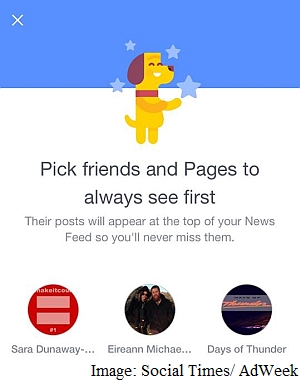
facebook_see_more_of_what_you_love_bubble_adweek.jpgFacebook is testing a new feature on mobile app,  that allows users to select friends and pages whose posts they’d want to see atop News Feed. With the move, Facebook is essentially bypassing the priority scaling of its own News Feed sorting and display algorithms by letting users choose what is most important to them.

Facebook told AdWeek's Social Times :

"We are always exploring new ways to improve the Facebook experience, and are currently running a small test of a feature that lets you indicate that you'd like to see posts from a specific person or Page at the top of your News Feed,"

Facebook  has confirmed it is testing the feature, and has not yet detailed plans of a global rollout yet. The News Feed
algorithms will continue to work for posts by other users or pages than those selected by users. The 'See more of what you love' feature under testing is in effect similar to the opt-in notifications that users can choose to receive from their friends and pages, ensuring they receive the latest updates from those entities. The biggest difference however appears to be that the new feature will place posts by the selected friends and Pages on top of the News Feed.

First reported by AdWeek's Social Times, the new feature is being tested on mobile and shows up on the News Feed. Users can choose to dismiss the notification of the feature, and skip choosing the friends and Pages they want to see on top of their News Feed.

If they tap 'Get started' however, they are shown a list of friends and Pages they regularly interact with to choose from. The screenshots are unfortunately unclear as to whether there's a limit to the number of entities that can be selected, or whether users can also arch from their list of friends and liked Pages to choose their favourites.


Regards : Top mobile app development company


Friday, 24 April 2015


Attracting a potential customer, grabbing their interest and retaining then is a difficult task. It is important to deign a site that does not frustrate customers there by maximize customer retention.

"What not to do while designing a website"


1. Bad navigation :
Nothing frustrates a website visitor more then a website hard to navigate. complex or inconstant navigation can cause user to feel helpless and confuse.

2. Too many ads :

Visitors feels suffocating with so many ads around the website (pop, flash). Dont fil entire browser with ads.

3. Bad content structure : 

Bad content structure can destroy your conversion and retention rates. make your content easy to find. It is estimated that more then 50% of sales are lost because potential customers can't find what they are looking for.

4. Obtrusive audio or video :

Having audio or vidio that loads automatically can potentially drive visitors away.

5. The registration requirement : 

Forcing visitors to register before he/she view the content is much like physical barrier Force registration may ultimately cause visitors elsewhere for what they are looking for.


Regards : Web designing company


Thursday, 23 April 2015


Today Facebook has launched an app Hello, designed to replace the default dialler on your Android phone.

As you’d expect, it’s closely tied to your Facebook account with caller ID data pulled in even if you don’t have the caller’s number in your phone’s contacts list. It allows you to make calls and send messages via Messenger instead of your cellular connection.

Yes, after the failure of its Home launcher, Hello is Facebook’s latest attempt at a ‘Facebook Phone’ on Android. To help encourage you to switch over to the app, it’s got a feature that is genuinely interesting and useful even if you aren’t a hardcore Facebook user – the ability to automatically block calls from numbers that have been blocked by a lot of other people. That sounds perfect for getting rid of those spam ‘insurance’ and ‘Windows support’ calls. However, The Verge reports that these calls are simply sent to voicemail rather than properly blocked.

Whether that will be enough to draw you and your phone further into Facebook’s orbit is up to you.

Regards : Top Mobile app development company


Wednesday, 22 April 2015

Magento development companyTo setup online stores many online store owners prefer  Magento platform because Magento is user friendly and has a great support system in the form of themes, plugins and extensions to make the online store highly impressive and powerful. 

But  its basic setup might not fulfill all your needs. You have to take the extra effort of searching the web and selecting your own automation tools, email management system, currency / shipping conversion system, caching system, social networking tools etc.


This sounds like a really difficult task right?


Our experts makes these things easy for you by providing with a quick list of Magento connect extensions that will help you to reduce the setup time of your store and also help you to fulfill all your needs for your online store.


1. Olark 


If you are looking for live conversations along with ticket based support, then Olark is the right platform, Olark integrates with ticket support applications like Zendesk. You can consider using Olark because it enables customization and provides with reporting capabilities.


2. MatrixRate – By WebShopApps


It is not an easy task to manage shipping process, especially if you have launched your first online store.The worst part is that there is going to be a price difference in the products that you are offering. MatrixRate helps you to tackle with the problem of variation in the shipping costs in terms of location, weight, quantity and other variables. Through MatrixRate, you can create different tables for applying a shipping cost to the customer’s order and thereby different product prices can be easily managed.


3. XML Map Creator – By Magestore


As the name suggests, this extension enables you to create an XML sitemap for your website for free! Generating an XML sitemap can be a big advantage for your online store. Big search engines like Google and Bing provide the webmasters with sitemap submission options, all you have to do is take the created sitemap and submit it. As a result of this, the search engines will be able to detect your entire site and crawl it. This potentially number of pages of your website that get indexed.


4. Blog – By aheadWorks


We all know the importance of having a blog on the website. The blog extension provides with an easy setup for establishing a blog on your Magento store. It is easy to use and free! aheadWorks constantly works on improvising on this extension and provides updates for it on a regular basis.


5. Yotpo


It is extremely important to have a review system on your website. As a result of s review system, it becomes easier to manage things like SEO content, email based review requests and similar marketing aspects. Yotpo takes all the necessary things into consideration for designing a review system and provides you with the perfect framework. Yotpo makes sure that your company reviews are doing the best for your SEO. The best thing about Yotpo is that you can filter out the reviews.


6. Zendesk


If you plan on getting your customer support completely organized, Zendesk is a great way to do it. For a single agent, the cost that you will have to incur will be $12 a year or $2 per month. In case you own a big online store with many customer service executives, then through Zendesk, you can help them to get more organized. You can also monitor the service reputation of your company and make improvisations in it if required.


7. eShop Connect 


If you are in lookout of a good backend application for managing the stock of your online store, then eShop Connect is what you need. Through eShop Connect, you can easily control the processes like controlling stock, order processing, drop shipping, managing stock etc. eShop Connect is combined with Interprise Suite ERP that helps in effective stock management at affordable prices.eShop Connect also enables you to set your own preferences and rules for selling through multi-channel internaltional marketplaces that comprise of Amazon and eBay.


8. Vertical Navigation With CSS Classes


With the help of this extension, you can design your own vertical cvategory navigation along with product count and sub cvategories. Every element comprises of fine CSS through whixh you can address every element or group through the ‘first’ and ‘last’ element of the group and also include the ‘previous’, ‘active’ and ‘next’ elements. As a standard protocol, this application removes top.navigation through XML-update and places the vertical navigation in the left structural block.


9. PAYONE Payment Extension


Payone is a popular payment extnaions with over 50,000 downloads and it is one of the most successful payment extensions of Magento. What makes this payment extension beneficial is that all the payment methods and services are clubbed from one sourece and offered by one partner. Complete automation is offered for all the payment processes. Payone is a safe extension as it ptovides with smart risk management features along with fraud prevention and payment method control.


10. ShipWorks


Last but not the least! ShipWorks is a multi-carrier, multi-channel extension that brings together your complete eCommerce world. Through ShipWorks, you can easily print shipping labels and batches, track customer emails through numbers, update the online order status, generate reports and much more. Along with Magento, ShipWorks is also integrated with 50 other shopping cart applications like eBay, ChannelAdvisor, Etsy and Amazon.


I would love to know which Magento extensions you have been using for powering your online store, share your experiences!

Regards : Web Development company


  • RSS
  • Delicious
  • Digg
  • Facebook
  • Twitter
  • Linkedin
  • Youtube